Thursday, July 23, 2020

MSSQL: Getting more detail information for failed jobs.


Often when a job failed, it provides trivial information for diagnostic. In order to expand the detail of the failed job, it can be done through "Include execution trace messages"

https://docs.microsoft.com/en-us/sql/ssms/agent/write-execution-trace-messages-to-sql-server-agent-log-ssms?view=sql-server-2017

SQL Server Agent --- Right Click --- Properties


Thursday, August 1, 2019

MSSQL: Datawarehouse: catalog.executable_statistics view missing

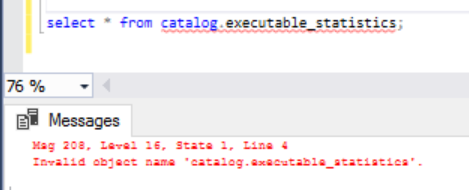
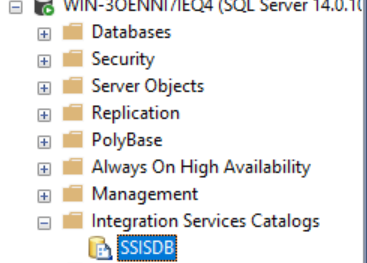
Trying to query the catalog.executable_statistics view and the object is missing. The reason is, there isn't SSIS project or packages being set up and deployed on this database. Quick viewing for SSISDB  (it can be any name aside from SSISDB) did not show up the Databases list. 


Msg 208, Level 16, State 1, Line 4
Invalid Object name 'catalog.executable_statistics'.


Integration Services Catalogs have no Projects or Packages.


Let's create Integration Services Catalog


Step 1: Create Catalog


There is a bug on my Create Catalog screen where the OK button is missing. Display Resolution issue.


Step 2: After creating the Catalog, right-click and Create Folder.


Step 3: Once Folder is created, Deploy the project.


Note: I have created a project to perform ETL prior to this exercise. So my package already existed.


The path can be located in the Visual Studio after the package is built.


Note: I have a little glitch here where the Next button is grayed out. Go into the Server Name and reselect and it will repopulate the Server Name and now the Next button is activated and the Path has a path as well. 


Completed the Project Deployment and package is created.


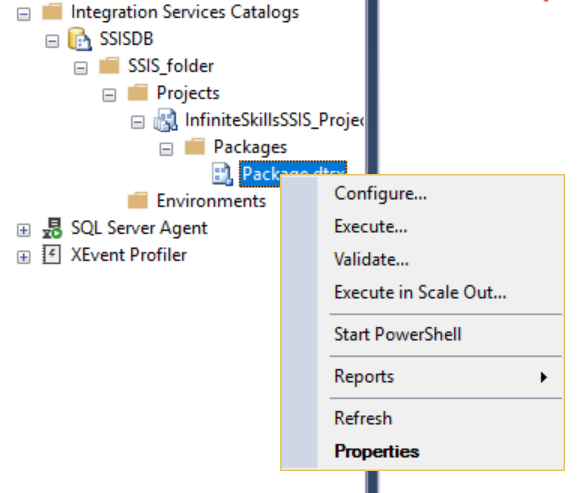
Step 4: Now execute the package.


The SSISDB should be created by now and the catalog.exectable_statistics should work.


That's it. Executable_Statistics view is great to provide information for a package execution time, duration and results.


References:
https://docs.microsoft.com/en-us/sql/integration-services/catalog/ssis-catalog?view=sql-server-2017


Thursday, July 25, 2019

MSSQL: Database Diagram V17.9 feature crashed

Trying to map FKs between Dimension and Fact Tables and Database Diagram crashed with error message "Index was outside the bounds of the array". Can't get around it and error sounds like running out of memory. 


Closed everything and reopened get me going again. The issue seems pretty random.

Monday, July 15, 2019

MSSQL: Create a copy of a table and database

Create a copy of a static database.

CREATE DATABASE VCDB_COPY AS COPY OF VCDB

In a way, this is very much creating and restoring from a full backup. 


MSSQL: Instant File Initialization

Enabling Instant File Initialization can potentially improve over performance. It works a similar manner as thick eager provisioning in vCenter than letting it grows as it needs by zeroing the disk.

How To Enable Instant File Initialization
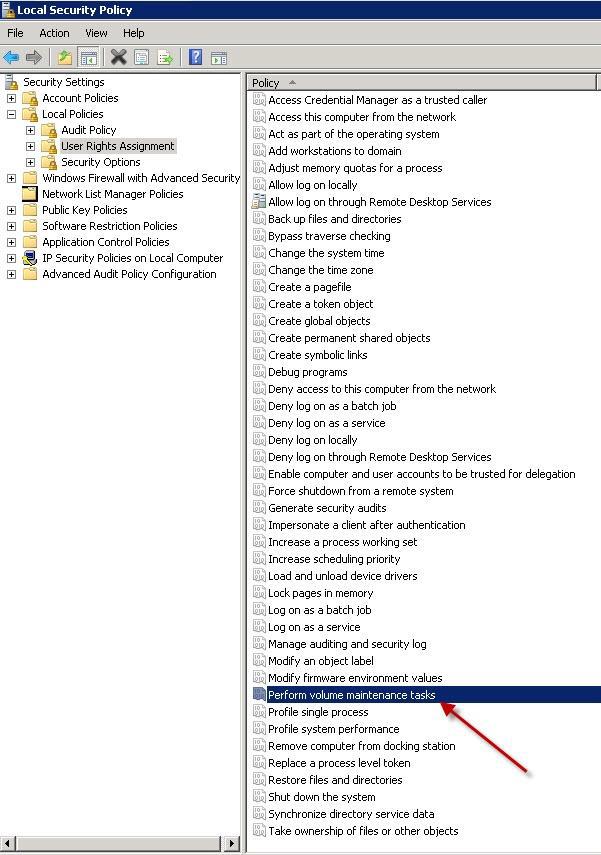
1. Open Local Security Policy and go to Local Policies –> User Rights Assignment.


2. Double click Perform Volume Maintenance Tasks and add your SQL Server database engine service account.
3. Restart the SQL Server service using SQL Server Configuration Manager and this setting should now be enabled.

MSSQL: Using DBCC to gather statistic

Trying to get statistic for performance diagnostic for a bloated vCenter table - VPX_EVENT.

https://docs.microsoft.com/en-us/sql/t-sql/database-console-commands/dbcc-show-statistics-transact-sql?view=sql-server-2017
dbcc show_statistics ("table_name", index_name);
use vcdb_2016
dbcc show_statistics ("vpx_event", pk_vpx_event);
dbcc show_statistics ("vpx_event", pk_vpx_event) with histogram;

MSSQL: Rebuild Index ONLINE

Comparing Rebuild Online on databases that I am familiar with. 

SQL Server
alter index xxxx rebuild ON VPX_VM REBUILD WITH (ONLINE = ON);
alter index xxxx rebuild ON VPX_VM REORGANIZE;

Oracle
alter index xxxx on VPX_VM online;
alter index xxxx rebuild ON VPX_VM REORGANIZE;

Postgresql
alter index xxx on VPX_VM online;
(No Reorganize feature for Postgresql until Postgresql 10)
Alternatively, performing Rebuild Index concurrently.

The awkward way of SQL Server to rebuild index online.

Thursday, May 16, 2019

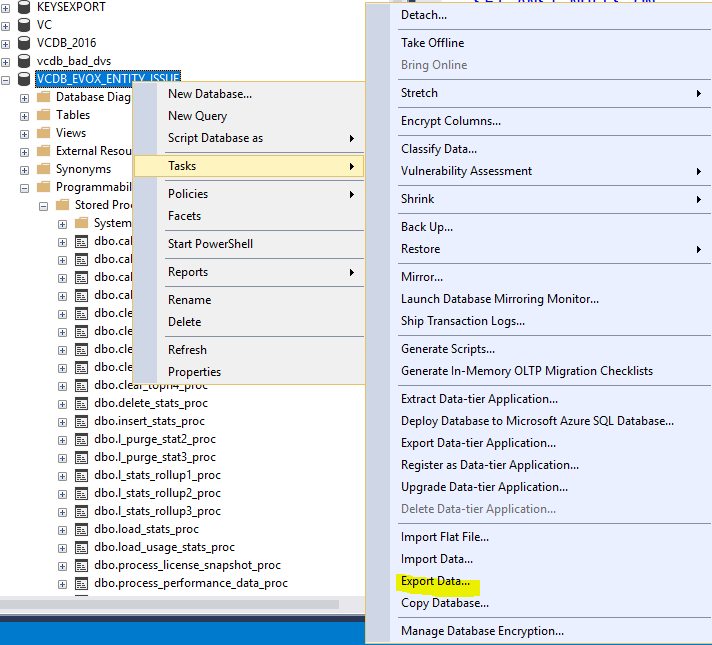
MSSQL: Export a single table in CSV format

Sometimes, development may request a database to be cloned in-house to look at certain data. Most of the times, the administrator will clone the database to an internal lab where only a single table of interest to be looked at. This is quite waste of the time to backup hundred of Gigs of the database, bandwidth is transferring them, a large amount of space taken to store the database backup, later transfer it to an internal lab and restore it to a SQL Server instance. Storage usage to look at a single table is taken 4 times the size of the database from backup, storage, transfer and restored.

The administrator can easily achieve this in no time by exporting a single copy of the table in CSV. Development may likey not even needing the SQL Server to look at the table since CSV can be opened with Excel spreadsheet.


Importing it back to a SQL Server works the same way. For a smaller table, an administrator can simply perform a query and copy the result out from the output.

sqlcmd that works the same too if the user already knows what s/he wants especially the separator.

sqlcmd -S . -d VCDB_2016 -E -s "^" -W -Q "select * from vpx_event" > E:\vpx_version.csv

Monday, May 13, 2019

MSSQL: Setup SQL Server with None Default Port


Not many sites talk about this and providing screenshots on how to configure and enable non default Port for SQL Server.

Step 1: Configure the SQL Server Network Configuration to enable TCP/IP and specify a non-default port.


Step 2: Enable The TCP/IP

Step 2b: In my example, I am pretending 1433 is a non-default port. If the user desire to change it to anything else, click on the IP Address tab and scroll ALL THE WAY DOWN and change the port of 1433 to something else.


Step 3: Once completed, the service needs to be restarted.


Step 4:  Start Menu - type "ODBC" . Fill in the information on the first page and click Next to the end, then click Finish. At the Finish page, click on Test Connection.


Step 4a: In order to connect SQL Server database with a non-default port. It can simply be done through simply appending the port number after the Server Name with a "," in between.


Test the connections. If the connection is successful, the user will be prompt with a successful page. Otherwise, it will be a Test Failed page.


Test Failed if steps are incorrect.


Other steps may be necessary depending on what you do

- Enable SQL Server Browser for automatic discovery.

- Enable firewall for non default port on the Windows Server

- Enable remote admin
https://docs.microsoft.com/en-us/sql/database-engine/configure-windows/remote-admin-connections-server-configuration-option?view=sql-server-2017

sp_configure 'remote admin connections', 1; GO RECONFIGURE; GO

Wednesday, April 17, 2019

MSSQL: Tracking Pages Recovery and restoring

Tracking Pages Recovery and restoring

Prerequisite
The database must be FULL or Bulk-logged Recovery Model.

To save time and reducing further I/O contentions on the database by running DBCC CHECKDB, we can use PHYSICAL_ONLY.

DBCC CHECKDB WITH PHYSICAL_ONLY
RESTORE DATABASE VCDB_2016 PAGE='2:42' FROM BACKUP WITH NORECOVERY.

This can be achieved with GUI as well.

  1. Right Click at the database needs to be restored.
  2. Select Task - Pages


Tuesday, April 16, 2019

MSSQL: Improving the statistic plan for dynamic queries and procedures.

Dynamic queries are those that having similarity yet not exactly the same syntax and causing them to be cached for reuse by the planner. This can cause bloating to memory usage. In order to tackle the shortcomings, the user can set the optimizer for ad hoc only. Memory utilization can grow out of a desirable level.

Figure out what is the current plan size.

SELECT objtype, cacheobjtype,  AVG(usecounts) AS Avg_UseCount,  
SUM(refcounts) AS AllRefObjects, 
 SUM(CAST(size_in_bytes AS bigint))/1024/1024 AS Size_MB
FROM sys.dm_exec_cached_plans
WHERE objtype = 'Adhoc' AND usecounts = 1
GROUP BY objtype, cacheobjtype;


Run sp_configure to find out what the optimize for ad hoc set to.


Example of changing the optimize for ad hoc workloads and reduce procedure cache usage from these statements without creating any additional indexes.

USE VCDB
EXEC sp_configure 'show advanced options', 1
RECONFIGURE 
GO
EXEC sp_configure 'optimize for ad hoc workloads', 1
RECONFIGURE
GO 

After reconfiguring the optimizer for ad hoc workloads, the config_value would change to 1.


Example of clearing procedure cache. 
alter database scoped configuration clear procedure cache;

This is relatively similar to Oracle's shared pool cache clearing in term of mechanism.
alter system flush shared_pool;

Friday, April 12, 2019

MSSQL: Enable and Disable SQL Server Agent log


Something to watch out on "SQLAGENT.OUT" log if it gets too large. It is disabled (unchecked) by default. Enabling this, it will log all the job execution traces to SQLAGENT.OUT and may grow rapidly. 


Here is where to locate the "Include execution trace messages" feature.


The Include execution trace messages can be turned On or Off without restarting the agent.

Wednesday, April 10, 2019

MSSQL: Retrieving detail errors with Extended Events.

SQL Server have errors but lacking of information


Utilizing Extended Event to retrieve more detail errors where Windows Events did not provide meaningful hints (pretty typical)


https://www.mssqltips.com/sqlservertip/3214/use-extended-events-to-get-more-information-about-failed-sql-server-login-attempts/

Tuesday, April 9, 2019

MSSQL: SQL Server Job Agent detail.

SQL Server job agent has a limitation in reporting job steps error messages. First, it only maintains up to 9 most recent error events and detail trace do not get written to it.

https://docs.microsoft.com/en-us/sql/ssms/agent/sql-server-agent-error-log?view=sql-server-2017


In order to get more complete details, the errors need to be directed to a specific file. How to configure the error to be direct to a file will be shown here. This can be confusing to get to.


SQL Server Agent 
|-----Jobs
       |-----Name of the job (Right Click)
               |-----Properties
                         |-----Steps
                                 |-----New
                                        |-----Advanced page

                               [This where the user can allocate a file to store the errors in detail.]


The errors logged to the StoreJobFailureDetails will be very verbose.


MSSQL: Getting more detail information for failed jobs.

Often when a job failed, it provides trivial information for diagnostic. In order to expand the detail of the failed job, it can be done th...