Thursday, March 7, 2019

MSSQL: How to mirror a database from one server to another.

How to mirror a database from one server to another.

Mirroring a database to a second node is fairly simple. There are basically 4 steps where Restore will be in NORECOVERY mode.


Prerequisite
  1. The database must be in a FULL RECOVERY MODE. 
  2. Identical windows and SQL Server logons and privileges.

Verify database recovery model.

SELECT name, recovery_model_desc FROM sys.databases WHERE name = 'VCDB_2016' ; 


If it is not in FULL RECOVERY such as SIMPLE or BulkLogged, switch it to FULL.

USE MASTER
ALTER DATABASE VCDB_2016 SET RECOVERY FULL;


Step 1: Full Database Backup

BACKUP DATABASE VCDB_2016 TO DISK = N'C:\BACKUP\VCDB_2016_BACKUP.bak' WITH FORMAT;


Step 2: Backup transaction logs

BACKUP LOG VCDB_2016 TO  DISK = N'E:\BACKUP\VCDB_2016_BACKUP.trn'
GO


Both Database and Transaction Logs backup.


Step 3: Copy to node 2 and Restore Database with NORECOVERY

RESTORE DATABASE VCDB_2016 FROM DISK = N'E:\BACKUP\VCDB_2016_BACKUP.bak' WITH NORECOVERY
GO


Step 4: Copy to node 2 and Restore with Transaction Log with NORECOVERY

RESTORE LOG VCDB_2016 FROM DISK = N'E:\BACKUP\VCDB_2016_BACKUP.trn' WITH FILE=1, NORECOVERY
GO


MSSQL: Setting trace on deadlock

-- Monitoring deadlock after SQL Server Started.
DBCC TRACEON(1222,-1)
- to turn off
DBCC TRACEOFF(1222,-1)


-- Monitoring deadlock requires SQL Server to start or restart.
Startup Parameter = -T1222


-- Deadlock information will be written into the error log.

Open the error log and search for "deadlock". If there are deadlock around, it should indicate the query and tables a few lines down below.

Tuesday, March 5, 2019

MSSQL: Creating auditing in SQL Server.

This blog will demonstrate how to set up Audit in vCenter SQL Server database. 

There are 3 layers of auditing. They are Server-level, Database-level, and Audit-level. In this blog, I am going to cover the Database-level auditing on VCDB database..

An audit event is to use to track and auditing changes made to the database.

SQL Server Database Audit has 3 main parts.
  • Server Audit. This to be created at the Master database level.
  • Audit Specification. This to be created at the user database level.
  • Turn ON both Server Audit and Audit Specification
The audit locations can be directed to either audit file, security event log or application event log. The following example will direct the audit information to an application log.
 Use Master  
 create server audit svr_audit to application_log  
 go  
 alter server audit svr_audit with (state=on)  
New Server Audit will show up under the database instance level.

 use VCDB_2016  
 create database audit specification db_audit_spec  
 for server audit svr_audit add (insert on dbo.vpx_version by public);  
 go  
 alter database audit specification db_audit_spec with (state=on);  
On the database tree, the new audit will show up and by default, it is OFF. This can be turned ON or OFF.
Query the status of the Server Audit status.
 select * from sys.dm_server_audit_status;  


Audit specifications can be located with the following query.
 select * from sys.database_audit_specification_details  

That's it. Auditing is useful if DBA needs to locate suspicious activities in certain objects.


Additional useful reference can be found at this link. 
https://docs.microsoft.com/en-us/previous-versions/sql/sql-server-2008-r2/cc280663(v=sql.105)


Sunday, September 16, 2018

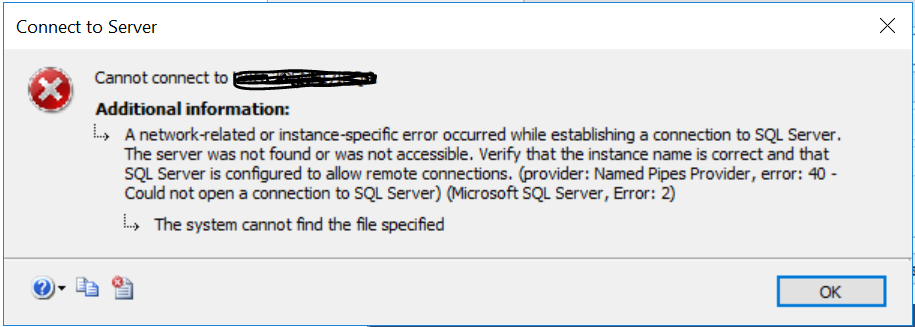
MSSQL: Could not open a connection to SQL Server (Microsoft SQL Server, Error: 2)


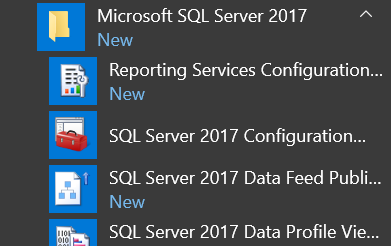
Unable to connect to SQL Server database initial Win 2017 boot up. The error message looks like network related but I was able to connect to it locally either. It turned out that the Microsoft SQL Server Database Engine was not running even though, it has been set to Auto Start.


Get to SQL Server 2017 Configuration


After starting the SQL Server, I was able to connect.

Moving the SQL Server to SSD drive enable the SQL Server engine to start upon Windows Server starting up. My guess is, this may be due to slow disk causing the SQL Server engine to timeout on trying to start the service when Windows first starting up.

Tuesday, June 19, 2018

MSSQL: is out of bounds for sequence "vpx_event_seq"


This can trigger in VCSA where database sitting in SQL Server. As the error message indicates, the sequence of 0 is outside of the bound of the sequence. Resetting should fix this issue.


setval: value -1786008095 is out of bounds for sequence "vpx_event_seq" (1..9223372036854775807)


VCDB=# SELECT setval('vpx_event_seq', 0)
VCDB-# ;


ERROR:  setval: value 0 is out of bounds for sequence "vpx_event_seq" (1..9223372036854775807)
VCDB=# SELECT setval('vpx_event_seq', 1000);
setval
--------
   1000
(1 row)

Monday, April 17, 2017

MSSQL: CHECKDB found 0 allocation errors and X consistency error


Found corruption error while running DBCC CHECKDB on the SQL Server DB.

Error messages

Msg 8990, Sev 16, State 1, Line 2 : CHECKDB found 0 allocation errors and 10 consistency errors in table 'VPX_EVENT' (object ID 138483572). [SQLSTATE 01000]
Msg 8989, Sev 16, State 1, Line 2 : CHECKDB found 0 allocation errors and 10 consistency errors in database 'VCDB'. [SQLSTATE 01000]
Msg 8958, Sev 16, State 1, Line 2 : repair_allow_data_loss is the minimum repair level for the errors found by DBCC CHECKDB (VCDB). [SQLSTATE 01000]

This is data loss corruption similar to Oracle’s datafile header corruption. Damage already been done. User can use repair_allow_data_loss feature as the SQL Server error suggested or restore from good backup. If backup available, I would prefer restoring the db or the specific table. The good news is, the VPX_EVENT isn’t a crucial table. It stores events related information.

Here is what can be done on the repair route. Another option is to clone the existing VCDB to a different MSSQL database and test out the procedures. If everything works smoothly (verified with no data loss), perform the same on the production side.


--If user decided to do it in existing db then take backup of the VCDB first
use VCDB
--verify the corruption still exist
DBCC CHECKDB
--this can only be done in single user mode. So, switch it to single user.
ALTER DATABASE VCDB SET SINGLE_USER;
--attempt with REPAIR REBUILD first where it will attempt to repair without data loss.
DBCC CHECKDB ('VCDB', REPAIR_REBUILD);
--To verify if corruption still exist.
DBCC CHECKDB;
--if it does, move on to repair allow data loss feature, this will result of masking out the corruption where there will unrepairable data loss.
DBCC CHECKDB ('VCDB', REPAIR_ALLOW_DATA_LOSS);

Once completed, set the db back to multi users, otherwise no one else can access the database.

ALTER DATABASE VCDB SET MULTI_USER;


DBA should find out what causes this corruption. This typically results of disk issues.


Monday, December 19, 2016

MSSQL: MSSQL on Linux datafiles with C prompt


Installing MSSQL on Linux is fairly straightforward.

Installation 

For MSSQL on Ubuntu simply follow this link.

SQL Server installation does enforce the 3.25Gig memory size. So, prior to start the installation makes sure your environment or VM do have around 4gig of memory to work with. I allocated 60Gig on my VMs. After the Ubuntu Server 64 bits deployment and MSSQL installation, I still have 52gig left.

The main point of this blog is not to guide the user to deploy MSSQL on Linux but to show one of the interesting behavior I noticed.


administrator@ubuntu:/var/opt$ sqlcmd -U SA
Password:
1> select @@version;
2> go

------------------------------------------------------------------------------------------------------------------------------------------------------------------------------------------------------------------------------------------------------------------------------------------------------------
Microsoft SQL Server vNext (CTP1.1) - 14.0.100.187 (X64)
Dec 10 2016 02:51:11
Copyright (C) 2016 Microsoft Corporation. All rights reserved.
on Linux (Ubuntu 16.10)

(1 rows affected)


1> select name from sys.databases;
2> go
name
--------------------------------------------------------------------------------------------------------------------------------
master
tempdb
model
msdb

(4 rows affected)
1>


As you can see here, the datafile path starts with C:\ prompt.

SELECT cast(DB_NAME(database_id) as varchar(20)) AS "Database Name",
       cast(Name as varchar(25)) AS "Logical Name",
       cast(Physical_Name as varchar (100)) as "Datafiles Path",
       (size * 8) / 1024 as "Size in MB",
       (size * 8) / 1024/ 1024 as "Size in Gig"
FROM sys.master_files;

Database Name        Logical Name              Datafiles Path                                                                                       Size in MB  Size in Gig
-------------------- ------------------------- ---------------------------------------------------------------------------------------------------- ----------- -----------
master               master                    C:\var\opt\mssql\data\master.mdf                                                                               4           0
master               mastlog                   C:\var\opt\mssql\data\mastlog.ldf                                                                              2           0
tempdb               tempdev                   C:\var\opt\mssql\data\tempdb.mdf                                                                               8           0
tempdb               templog                   C:\var\opt\mssql\data\templog.ldf                                                                              8           0
model                modeldev                  C:\var\opt\mssql\data\model.mdf                                                                                8           0
model                modellog                  C:\var\opt\mssql\data\modellog.ldf                                                                             8           0
msdb                 MSDBData                  C:\var\opt\mssql\data\MSDBData.mdf                                                                            13           0
msdb                 MSDBLog                   C:\var\opt\mssql\data\MSDBLog.ldf                                                                              0           0


A user can access the physical datafile with sudo.

administrator@ubuntu:/var/opt$ sudo ls -las /var/opt/mssql/data/
total 53320
    4 drwxr-xr-x 2 mssql mssql     4096 Dec 19 10:54 .
    4 drwxrwx--- 7 mssql mssql     4096 Dec 19 10:55 ..
 4096 -rw-r----- 1 mssql mssql  4194304 Dec 19 11:06 master.mdf
 2048 -rw-r----- 1 mssql mssql  2097152 Dec 19 12:06 mastlog.ldf
 8192 -rw-r----- 1 mssql mssql  8388608 Dec 19 11:00 modellog.ldf
 8192 -rw-r----- 1 mssql mssql  8388608 Dec 19 11:00 model.mdf
13632 -rw-r----- 1 mssql mssql 13959168 Dec 19 10:55 msdbdata.mdf
  768 -rw-r----- 1 mssql mssql   786432 Dec 19 10:55 msdblog.ldf
 8192 -rw-r----- 1 mssql mssql  8388608 Dec 19 10:55 tempdb.mdf
 8192 -rw-r----- 1 mssql mssql  8388608 Dec 19 11:00 templog.ldf

Interesting that SQL Server still keeping the Windows behavior.

MSSQL: Getting more detail information for failed jobs.

Often when a job failed, it provides trivial information for diagnostic. In order to expand the detail of the failed job, it can be done th...